


How to Choose and Use Coax Cable Tools for Reliable Cable Installation
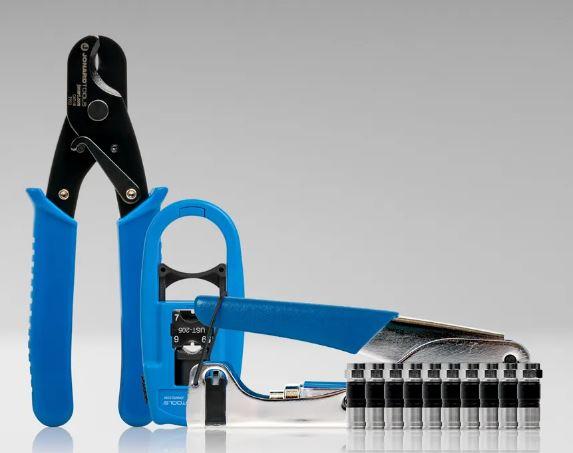
Coaxial cables play an important role in cable television, broadband internet, satellite communication, and other signal transmission systems. To install and maintain these cables properly, technicians need the right tools for cutting, stripping, connecting, and testing cables. Using unsuitable tools can damage the cable, create loose connections, and affect signal quality.
Whether you are a CATV technician, broadband installer, or beginner learning cable installation, understanding how to use the correct coax cable tools can make your work easier and more reliable. This guide explains how to select essential tools, prepare coaxial cables, attach connectors, and check completed connections.
Step 1: Identify the Cable Type and Installation Requirements
Before choosing your tools, identify the cable type and the connector required for the installation. Common coaxial cables include RG6, RG59, and RG11. Each cable has specific dimensions and applications, so not every tool or connector will work with every cable.
For example, RG6 is widely used for residential cable television and broadband installations, while RG59 is commonly found in certain legacy video systems. RG11 is often selected for applications that require longer cable runs.
Check the cable specifications and connector compatibility before starting the job. This helps you choose suitable coax tools and avoid unnecessary cable damage.
Step 2: Gather the Essential CATV Tools
Once you identify the cable, prepare the tools required for the job. Different installations may require different equipment, but several categories are useful for common cable work.
-
Coaxial cable strippers: Remove the outer jacket and prepare the cable for connector installation.
-
Cable cutters: Make clean cuts before preparing cable ends.
-
Compression tools: Secure compatible compression connectors to the cable.
-
Crimping tools: Attach compatible crimp style connectors.
-
Connector and flaring tools: Help install, tighten, or remove connectors, depending on the tool design.
-
Testing equipment: Check cable continuity, connections, and other supported cable characteristics.
-
Torque wrenches: Tighten compatible connectors to the specified torque.
-
Tool kits: Combine essential tools for technicians who regularly perform installation and maintenance tasks.
Choosing suitable CATV tools helps technicians complete repetitive jobs efficiently while maintaining consistent installation quality. Jonard Tools offers dedicated categories for stripping, compression and crimping, connectors, testing, and other coaxial cable applications.
Step 3: Cut and Strip the Coaxial Cable
Start by measuring the required cable length and cutting it cleanly with a suitable cable cutter. Avoid crushing or deforming the cable during this process because damage can affect the internal structure.
Next, use a coaxial cable stripper designed for the cable type. Follow the tool's instructions to remove the outer jacket and expose the required sections of the cable.
A typical coaxial cable contains an outer jacket, shielding, dielectric insulation, and a center conductor. Each layer has a specific function, so stripping requires care.
Follow these practices:
-
Confirm that the stripper matches the cable size.
-
Adjust the blade settings if the tool allows adjustment.
-
Rotate or operate the stripper according to its instructions.
-
Inspect the exposed cable for damaged shielding or insulation.
-
Confirm that the cable dimensions match the connector manufacturer's requirements.
Avoid cutting too deeply or damaging the center conductor. Incorrect stripping can cause poor connector fit, signal problems, or the need to repeat the installation.
Step 4: Prepare the Cable and Install the Connector
After stripping, prepare the cable end according to the connector manufacturer's instructions. Depending on the connector design, you may need to fold back shielding, expose the dielectric, or flare the cable end using a compatible tool.
Select a connector designed for the cable type and application. F-type connectors are common in cable television and broadband systems, while BNC connectors are used in certain video and RF applications.
Push the connector onto the prepared cable until it reaches the correct position. Check that the center conductor, dielectric, and shielding are aligned as specified by the connector manufacturer.
Correct preparation matters because a poorly fitted connector may create intermittent connections, unwanted signal loss, or other performance issues.
Step 5: Secure the Connector with a Compression or Crimping Tool
The next step is to secure the connector using the appropriate tool. Compression and crimping tools perform similar installation tasks, but they use different mechanisms and are not automatically interchangeable.
A compression tool applies controlled force to compress a compatible connector around the cable. A crimping tool uses a specified die or crimp profile to secure a compatible connector.
To complete the connection:
-
Verify that the tool matches the connector model and cable type.
-
Position the connector correctly in the tool.
-
Operate the tool according to the manufacturer's instructions.
-
Inspect the finished connection for proper seating and visible damage.
-
Confirm that the connector does not move or separate under normal handling.
Do not assume that one tool supports every connector. Selecting the correct equipment is essential for consistent results.
Step 6: Tighten Connectors Correctly
Some coaxial installations require connectors to be tightened to a specified torque. A suitable torque wrench helps technicians achieve the recommended tightness without relying entirely on hand strength.
Excessive tightening can damage connectors or connected equipment, while insufficient tightening can result in loose connections.
Before tightening, check the connector manufacturer's torque specification and select a compatible wrench. Use the correct wrench size and avoid applying additional force beyond the specified value.
This step is particularly useful in professional CATV, satellite, and broadband installations where consistent connections are important.
Step 7: Test the Completed Cable Connection
After installing the connector, inspect and test the cable before considering the job complete. The appropriate testing method depends on the installation and the equipment available.
A cable tester may help identify continuity problems, while specialized instruments can assess additional cable or signal characteristics. Follow the tester's instructions and use equipment suited to the system being serviced.
Check the following:
-
The connector is correctly seated.
-
The center conductor is positioned as required.
-
The shielding and dielectric are not visibly damaged.
-
The cable is free from severe bends, crushing, or kinks.
-
The connection passes the relevant tests.
If a connection fails, inspect the cable preparation and connector installation before replacing components unnecessarily.
Step 8: Maintain Your Tools and Organize Your Kit
Proper tool maintenance supports reliable performance and helps technicians avoid preventable installation errors. After completing a job, remove cable debris, inspect cutting blades, and check moving parts for damage or wear.
Store tools in a suitable case to protect them during transport. Keep replacement parts and compatible accessories organized so they are available when needed.
If you handle several types of installations, consider a tool kit that matches your regular work. For example, a basic coaxial installation kit may include a stripper, compression tool, cable cutter, and tester. More advanced fieldwork may require additional connector tools, torque wrenches, or specialized equipment.
A well organized kit saves time and makes it easier to maintain consistent working practices.
Common Mistakes to Avoid When Using Coaxial Tools
Even experienced technicians can encounter problems when they overlook small details. Avoid these common mistakes:
-
Using a stripper designed for a different cable size.
-
Damaging the center conductor during cable preparation.
-
Choosing an incompatible connector.
-
Using a crimping tool when the connector requires compression.
-
Applying excessive torque to connectors.
-
Skipping the final inspection and testing stage.
-
Continuing to use damaged or poorly maintained tools.
Correct tool selection and careful preparation help reduce rework and improve the reliability of cable installations.
Conclusion
Learning how to use the right tools is an important part of successful coaxial cable installation. From cutting and stripping to connector attachment, tightening, and testing, every step contributes to a dependable connection.
The best coax tools depend on the cable type, connector design, and requirements of the job. By selecting compatible equipment, following manufacturer instructions, and inspecting each connection, technicians can work more efficiently and reduce common installation problems.
Explore the Jonard Tools CATV/COAX/VDV collection to find cable preparation tools, compression and crimping tools, testing equipment, torque wrenches, and tool kits for professional cable installation and maintenance.
 French
 English
 Arabic
 Spanish
 Portuguese
 Deutsch
 Turkish
 Dutch
Dutch
 Italiano
 Russian
 Romaian
 Portuguese (Brazil)
 Greek
Greek