


How to Test Fiber Optic Cables: A Practical Guide to Reliable Network Performance
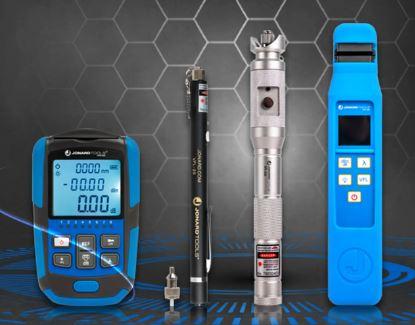
Fiber optic technology has become an essential part of modern communication networks. From high-speed broadband and telecommunications to data centers and business networks, fiber optic cables help transfer large amounts of data quickly and efficiently. However, even a well-installed fiber network can experience problems if connections are poor, cables are damaged, or optical signal levels are outside the required range.
This is where fiber optic test equipment becomes important. The right testing tools help technicians check signal strength, identify cable faults, measure optical loss, and troubleshoot network performance issues.
Whether you are installing a new fiber connection or maintaining an existing network, understanding how fiber testing works can help you complete jobs more accurately and reduce unnecessary troubleshooting time.
What Is Fiber Optic Test Equipment?
Fiber optic test equipment includes specialized tools used to evaluate the condition and performance of optical fiber cables and connections. These tools help technicians determine whether a fiber link is transmitting light correctly and whether the signal meets the requirements of the network.
Unlike copper cables, which transmit electrical signals, fiber optic cables carry information through light. Therefore, testing them requires equipment designed to measure optical signals and identify problems within the fiber link.
Common fiber optic testers include optical power meters, light sources, visual fault locators, optical time domain reflectometers (OTDRs), and passive optical network (PON) power meters.
Each device performs a different function. Some measure signal strength, while others help locate breaks, identify faults, or evaluate the overall condition of a cable.
Why Is Fiber Optic Testing Important?
Testing is an important step during fiber installation, maintenance, and troubleshooting. Without proper measurements, technicians may find it difficult to determine why a connection is slow, unstable, or completely unavailable.
Here are some key benefits of using fiber test equipment.
1. Identifies cable faults: Testing tools can help locate fiber breaks, damaged sections, and other faults that affect signal transmission.
2. Measures optical signal strength: Power meters help technicians check whether the received optical signal is within the expected range.
3. Helps verify installation quality: Testing after installation can reveal problems caused by poor connections, excessive bending, or incorrect cable preparation.
4. Reduces troubleshooting time: Instead of replacing cables without knowing the cause, technicians can use measurements to narrow down the problem.
5. Supports preventive maintenance: Regular testing can help identify developing issues before they cause significant network interruptions.
For broadband installers, fiber optic technicians, and network maintenance teams, these benefits make testing an important part of reliable network operation.
Different Types of Fiber Optic Testers and Their Uses
Choosing the right tester depends on the network, the type of fault you need to investigate, and the measurements required for the job.
1. Optical Power Meters
An optical power meter measures the power of a light signal traveling through a fiber optic connection. The reading is commonly displayed in dBm.
Technicians use these meters to check received signal levels, verify optical output, and investigate potential signal loss.
For example, if a broadband connection is experiencing problems, a power meter can help determine whether the optical signal reaching the equipment is within the expected operating range.
When selecting a meter, check its measurement range, supported wavelengths, connector compatibility, and calibration options. Jonard Tools offers several options, including the FPM-50A, FPM-55, and FPM-70.
2. Optical Light Sources
An optical light source sends a controlled light signal through a fiber cable. When used with a compatible optical power meter, it allows technicians to measure insertion loss across a fiber link.
This combination is particularly useful when testing newly installed cables or verifying connections after repairs.
For accurate results, use compatible wavelengths and follow the appropriate reference-setting procedure before taking measurements.
3. Visual Fault Locators
A visual fault locator (VFL) uses visible red light to help identify certain fiber faults. If light escapes through a break, damaged section, or poorly connected area, the location may become visible.
VFLs are useful for checking short fiber runs, identifying continuity problems, and finding some visible fault points.
However, a VFL does not replace an OTDR or optical power meter. Not every fault will be visible, particularly over longer distances or where the cable construction prevents light from being seen.
4. Optical Time Domain Reflectometers
An optical time domain reflectometer, or OTDR, sends light pulses into a fiber and analyzes the light reflected or scattered back toward the instrument.
This information helps technicians estimate cable length, identify the location of breaks, and investigate events such as connectors, splices, and areas of excessive loss.
OTDRs are especially useful for troubleshooting long fiber links and evaluating installed network infrastructure.
Jonard Tools offers the OTDR 1000 Multi Function OTDR, along with other testing solutions for fiber network evaluation. Always consider the required distance range, supported wavelengths, event resolution, and reporting features when choosing an OTDR.
5. PON Power Meters
Passive optical network (PON) power meters are designed for testing optical signals in fiber to the home and other passive optical networks.
Depending on the model, these instruments support technologies such as GPON, EPON, and BPON. They help technicians measure relevant optical signal levels when installing or maintaining broadband access networks.
Before selecting a PON tester, confirm that it supports the network technology and wavelengths used in your installation.
How to Test a Fiber Optic Cable Step by Step
A consistent testing process helps produce more useful results and makes troubleshooting easier.
Step 1: Identify the Testing Requirement
First, determine what you need to verify. Are you checking signal strength, measuring insertion loss, locating a break, or investigating a connection problem?
The answer will help you choose the appropriate test equipment.
Step 2: Inspect the Connectors
Check the fiber connectors and adapters for visible damage or contamination. Dirty connectors can introduce signal loss and lead to misleading measurements.
Use suitable fiber inspection and cleaning tools before connecting the equipment. Never look directly into a fiber connector or cable end, as the optical signal may be hazardous even when it is invisible.
Step 3: Select the Correct Tester
Choose equipment that matches the fiber type, connector, wavelength, and network requirements.
For example, use an optical power meter to measure signal levels or an OTDR when you need information about fault locations along a fiber link.
Step 4: Connect the Equipment Properly
Follow the instrument manufacturer's instructions for connecting the test leads and setting the required measurement parameters.
For insertion loss testing, establish the correct reference before measuring the link. For OTDR testing, configure the appropriate settings for the cable and test conditions.
Step 5: Record and Evaluate the Results
Compare the readings with the expected specifications or the network's acceptance criteria. A measurement outside the acceptable range may indicate dirty connectors, excessive bending, poor splices, or damaged cable sections.
Do not assume that every low reading indicates a broken cable. Check the connections, test setup, and measurement conditions before deciding on a repair.
Step 6: Troubleshoot and Retest
Use the test results to narrow down the cause of the problem. Clean or reconnect components when appropriate, repair damaged sections, and repeat the relevant measurements after corrective work.
Documenting the final results also helps with future maintenance and troubleshooting.
Common Mistakes to Avoid When Testing Fiber Networks
Even good equipment can produce unreliable results when used incorrectly. Avoid these common mistakes:
-
Skipping connector cleaning: Contamination can affect measurements and damage connector surfaces.
-
Using the wrong test equipment: Make sure the instrument supports the fiber type, wavelength, and connector being tested.
-
Ignoring reference settings: Incorrect reference procedures can lead to inaccurate loss measurements.
-
Misinterpreting results: A power meter and an OTDR provide different types of information and should not be treated as interchangeable.
-
Failing to document readings: Keeping test records makes it easier to compare results and identify recurring issues.
-
Ignoring laser safety: Follow the manufacturer's safety instructions and never look into an active fiber or optical port.
Taking a few extra minutes to check the setup can prevent unnecessary work and help produce more reliable results.
How to Choose the Right Fiber Test Equipment
When comparing fiber optic testers, consider the work you perform regularly.
For basic signal verification, an optical power meter may be sufficient. Technicians who need to measure insertion loss can combine a compatible power meter with an optical light source. For fault location and detailed link analysis, an OTDR may be more appropriate. PON technicians should select meters designed for their specific access network.
Also consider measurement range, supported wavelengths, connector adapters, portability, battery life, data storage, and reporting requirements.
Jonard Tools provides a range of fiber test equipment for technicians working in fiber installation, broadband, telecommunications, and network maintenance. Its collection includes power meters, light sources, PON meters, visual fault locators, optical fiber identifiers, and OTDR solutions.
You can explore the available products on the Jonard Tools Fiber Optic Test Equipment page.
Conclusion
Reliable fiber optic connections depend on more than correct installation. Testing helps technicians verify signal levels, identify faults, and confirm that a network performs as expected.
By understanding the different types of fiber optic testers and following a consistent testing procedure, technicians can diagnose problems more effectively and reduce avoidable service interruptions.
Before choosing fiber optic test equipment, consider your testing requirements, network type, and the measurements you need to perform. With the right tools and proper testing practices, you can improve installation quality, simplify troubleshooting, and maintain dependable fiber optic networks.
Explore Jonard Tools fiber optic test equipment solutions to find equipment suited to your next installation or maintenance project.

 English
 French
 Spanish
 Portuguese
 Deutsch
 Turkish
 Dutch
Dutch
 Italiano
 Russian
 Romaian
 Portuguese (Brazil)
 Greek
Greek