


Annunciation Window for Industrial Automation: Connecting Equipment Alarms with Operator Awareness
Introduction
Industrial automation has changed the way factories and production facilities manage equipment and manufacturing processes. Automated machines, programmable controllers, sensors, and electrical control panels work together to maintain consistent operations. However, even highly automated installations require effective communication between equipment and operators.
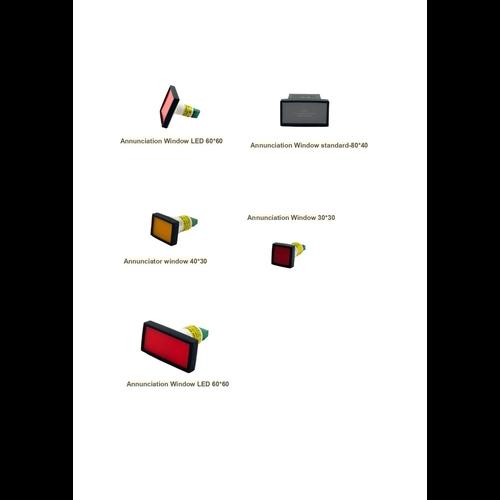
When a machine develops a fault or a process parameter moves outside its defined operating range, operators need to receive the relevant information. An Annunciation Window helps communicate such conditions through a visible indication on an annunciator panel. It allows different alarm signals to be displayed in an organised format, helping personnel identify which monitored equipment or process requires attention.
Understanding Alarm Indication in Automated Systems
Automation systems collect information from different field devices, including sensors, switches, transmitters, and protection equipment. Controllers process these inputs according to programmed logic and may generate alarm outputs when specified conditions occur.
These outputs can be connected to an annunciator system to provide visual indications.
For example, an automated production line may monitor motor operation, conveyor movement, temperature, pressure, and other process parameters. If a configured alarm condition occurs, the associated annunciator window can illuminate to inform the operator.
This arrangement helps connect automated monitoring with human supervision.
How Annunciation Windows Work with Automation Equipment
An annunciator system receives alarm signals from the automation or electrical control arrangement. Each input is assigned to a specific display window.
A typical operating sequence involves the following steps:
-
A field sensor or electrical device detects a monitored condition.
-
The signal is transmitted to a controller, relay, or monitoring circuit.
-
The control system evaluates the input according to its configured logic.
-
When an alarm condition is identified, the corresponding output activates.
-
The associated annunciation window illuminates.
-
The operator checks the label and follows the established response procedure.
The actual signal path depends on the control system design. In some installations, the annunciator receives signals directly from monitoring relays, while in others it is connected through a controller or dedicated interface.
Applications in Automated Manufacturing
Automated manufacturing facilities contain multiple machines that perform different tasks. Monitoring their operating conditions is important for maintaining coordinated production.
Conveyor Systems
Conveyors are commonly used to move materials between production stages. An annunciator arrangement may display selected indications related to motor trips, drive faults, or conveyor safety circuit conditions.
Packaging Machines
Packaging equipment uses sensors, motors, and control circuits to manage different operations. Dedicated alarm indications can help operators recognise machine interruptions or selected process abnormalities.
Pumping Systems
Automated pumping arrangements may monitor pressure, liquid level, motor status, and other operating parameters. An annunciator window can identify configured alarm signals from these systems.
Assembly Lines
Assembly processes often involve several interconnected machines. Alarm displays can help indicate which section has reported a fault or interruption.
Material Handling Equipment
Industrial material handling systems may use sensors, motors, and control devices. Visual alarm indications can support monitoring of selected equipment conditions.
Why Operator Awareness Remains Important
Automation can reduce the need for continuous manual control, but it does not eliminate the need for human supervision. Operators must still understand alarm information, review equipment conditions, and follow the correct response procedures.
A well-organised annunciator display supports this responsibility in several ways.
Clear equipment identification: Separate labels help operators recognise which machine or process has generated an alarm.
Centralised alarm visibility: Several monitored conditions can be presented on one panel.
Improved communication: Clear indications make it easier to explain equipment problems to maintenance personnel.
Structured monitoring: Grouping alarms by machine or production section makes the display easier to understand.
Support for maintenance planning: Alarm information can help teams identify equipment that requires inspection, although further diagnosis is needed to determine the root cause.
Important Features to Consider When Planning an Annunciator Panel
The performance of an annunciator system depends on its complete design. The following factors should be considered when selecting and arranging display components.
Number of Alarm Points
Estimate how many monitored conditions need individual indications. The number of windows should match the alarm schedule and allow practical space for future modifications where possible.
Display Readability
Window dimensions and label size should be suitable for the normal viewing distance. Operators should be able to read alarm descriptions without unnecessary difficulty.
Input Compatibility
Check the electrical characteristics of the alarm signals and ensure that the annunciator is compatible with the connected controller, relay, or monitoring circuit.
Alarm Priority
Not every alarm has the same operational importance. The system should define alarm priorities and communicate them consistently through approved indication conventions.
Acknowledgement and Reset
Where required, include suitable acknowledgement and reset facilities. Their operation should be clearly defined so that operators understand the difference between recognising an alarm and resolving its cause.
Environmental Suitability
Consider the temperature, dust, humidity, vibration, and other conditions surrounding the control panel. Select components according to their documented operating limits.
Annunciation Windows and Preventive Maintenance
Alarm information can also support maintenance activities. When equipment repeatedly generates an alarm, the maintenance team may investigate the related component, electrical circuit, or operating condition.
For example, repeated motor overload indications may lead to an inspection of the motor load, mechanical movement, supply conditions, or protection settings. The annunciator identifies the reported condition, while further testing determines its underlying cause.
Maintenance personnel should periodically inspect the display components, verify wiring connections, and test each configured alarm input. Any modification to the automation logic or alarm mapping should also be reflected in the annunciator labels and electrical documentation.
Common Mistakes in Industrial Automation Alarm Displays
Poor alarm presentation can make an otherwise capable monitoring system difficult to operate. Some common issues include:
-
Using unclear or outdated equipment labels.
-
Assigning inconsistent colours to similar alarm conditions.
-
Displaying too many low-priority alarms without proper grouping.
-
Failing to verify the connection between controller outputs and annunciator inputs.
-
Ignoring viewing distance and panel lighting.
-
Not updating alarm schedules after equipment modifications.
Addressing these points during design and commissioning can make alarm information more useful to operators.
Conclusion
Industrial automation depends on accurate monitoring as well as clear communication. An Annunciation Window helps bridge the gap between automated equipment signals and operator awareness by presenting selected alarm conditions in a structured visual format.
Whether used in manufacturing lines, pumping systems, packaging equipment, or material handling installations, an appropriately designed annunciator arrangement can support equipment monitoring and maintenance coordination. Proper signal integration, readable labelling, consistent alarm conventions, and routine testing are essential for achieving a dependable display system.
Utenti Verificati
 Italiano
 English
 Arabic
 French
 Spanish
 Portuguese
 Deutsch
 Turkish
 Dutch
 Russian
 Romaian
 Portuguese (Brazil)
 Greek